It looks like you are coming from United States, but the current site you have selected to visit is Finland. Do you want to change sites?

- Sign In
- Pyydä tietoja
- Hae sijaintia
-
Ota käyttöön suurikontrastinen tila
-
- Select language
- Africa (English)
- Afrique (Français)
- África (Português)
- África (Español)
- Argentina
- Australia
- Austria
- Azerbaijan
- Bahrain
- Belgium
- Belize
- Bolivia
- Brazil
- Bulgaria
- Canada English
- Canada Français
- Caribbean (English)
- Chile
- China
- Colombia
- Costa Rica
- Croatia
- Czech Republic
- Denmark
- Dominican Republic
- Ecuador
- El Salvador
- Europe
- Finland
- France
- Germany
- Greece
- Guatemala
- Guyana
- Honduras
- Hong Kong
- Hungary
- India
- Indonesia
- Iraq
- Ireland
- Israel
- Italy
- Japan
- Jordan
- Kazakhstan
- Korea
- Kuwait
- Lebanon
- Lithuania
- Malaysia
- Martinique
- Mexico
- Mongolia
- Netherlands
- New Zealand
- Nicaragua
- Norway
- Oman
- Panama
- Paraguay
- Peru
- Philippines
- Poland
- Portugal
- Puerto Rico
- Qatar
- Romania
- Saudi Arabia
- Singapore
- Slovakia
- Spain
- Sweden
- Taiwan
- Thailand
- Turkey
- U.A.E
- Ukraine
- United Kingdom
- United States
- Uruguay
- Uzbekistan
- Venezuela
- Vietnam
- Yemen

Ota käyttöön suurikontrastinen tila
Setting a timer for the pump
How to set a timer for the pump
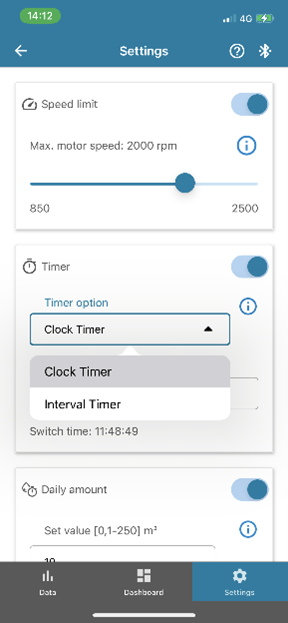
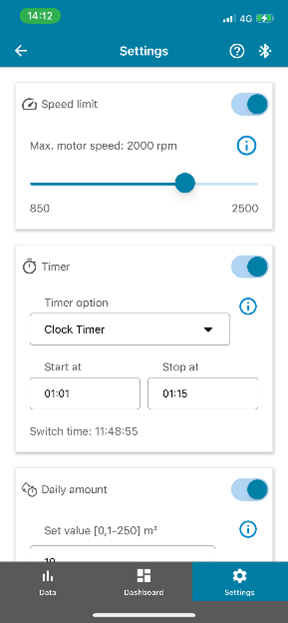
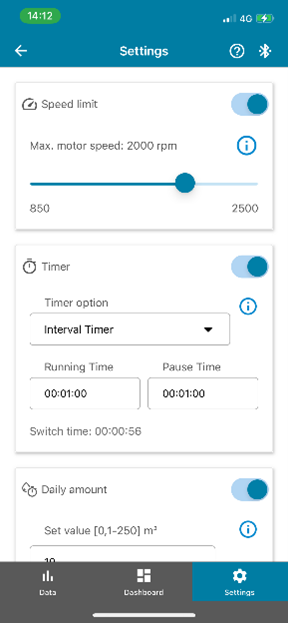
To set a timer, go to "Settings".
Activate the "Timer" function and select the type of timer needed. You can choose between "Clock timer" and "Interval timer".
- "Clock timer" will run the pump only in the time period chosen
- "Interval timer" will run the pump for the specified time and then pause for a specified time. This process repeats.
Further Reading
Etsi tuotteita
- Tietosuojakäytäntö
- Ehdot
- Päivitä asetukset
- Copyright 2026 Xylem. Kaikki oikeudet pidätetään.